How Progressive Web Apps Improve Mobile User Experience

Mobile users expect websites and applications to load quickly, respond smoothly, and remain easy to use regardless of their device or network connection. Businesses that cannot deliver a reliable mobile experience can lose engagement, leads, and potential customers.
This is where progressive web apps can make a significant difference.
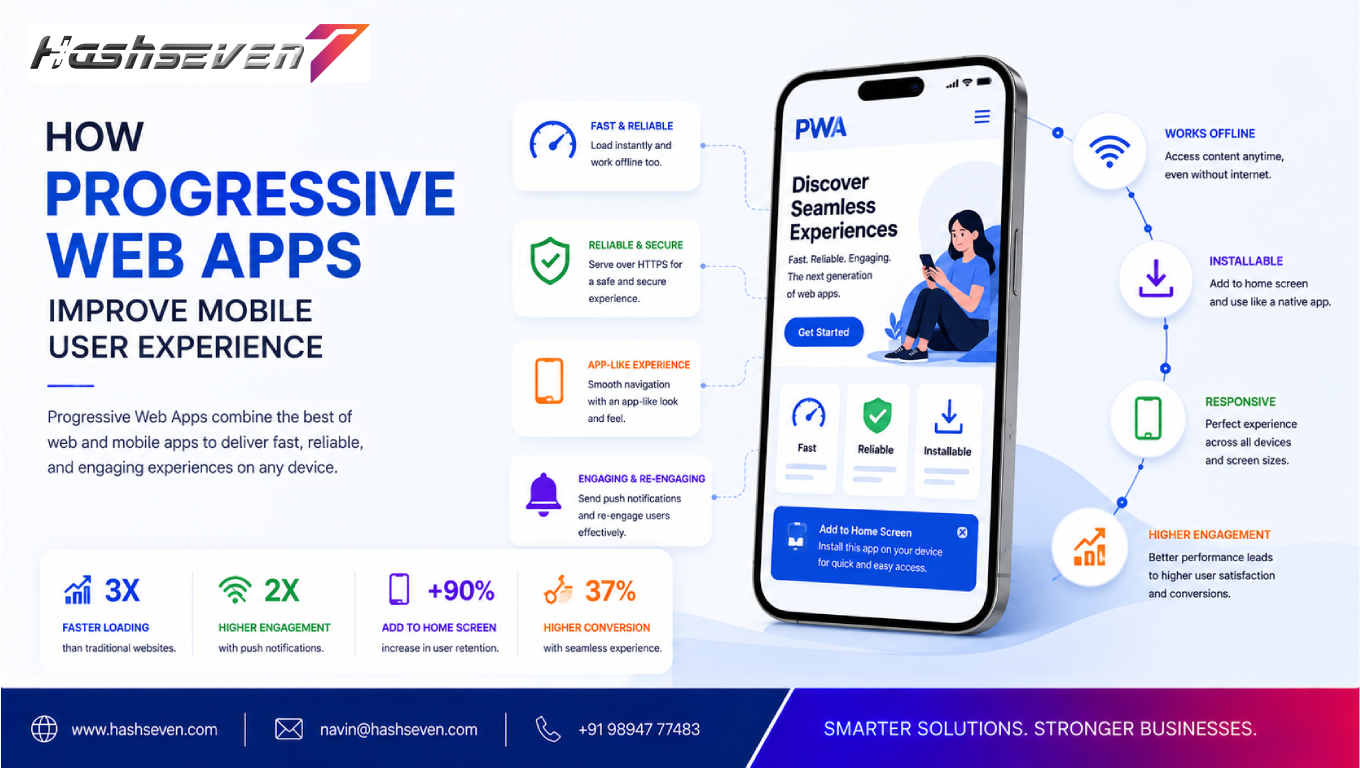
Progressive web apps combine the accessibility of websites with many capabilities traditionally associated with mobile applications. They can provide responsive experiences, fast loading, offline functionality, push notifications, and app-like interactions while remaining accessible through a web browser.
For businesses, this approach can create a more convenient mobile experience without necessarily requiring users to download a traditional application.
In this guide, we will explore what progressive web apps are, how they work, their benefits, and how they can improve mobile user experience.
What Are Progressive Web Apps?
Progressive web apps are web applications built using modern web technologies to provide an experience that can feel similar to a native mobile application.
Unlike traditional mobile apps, users can access a PWA through a web browser. Depending on the implementation and platform, users may also be able to install the experience on their device for easier access.
Progressive web apps are generally designed around several important characteristics:
- Responsive design
- Fast loading
- Reliable performance
- Secure connections
- App-like interactions
- Offline or limited-connectivity functionality
- Installability
- Push notifications where supported
The goal is to make web experiences more accessible, reliable, and engaging across different devices and network conditions.
Build a Website That Grows Your Business
A professionally developed website is the foundation of your online success. If you’re planning to create a responsive, fast, and SEO-friendly business website, explore our Website Development Services to see how Hashseven can help transform your ideas into a powerful digital presence.
How Do Progressive Web Apps Work?
Progressive web apps use several web technologies working together to create an enhanced experience.
Service Workers
A service worker is a script that runs separately from the main webpage and can help manage network requests, caching, and certain offline capabilities.
For example, a service worker can allow previously cached resources to remain available when the user temporarily loses internet connectivity.
Web App Manifest
A web app manifest provides information about how an installable web application should behave when added to a device.
It can define details such as:
- Application name
- Icons
- Start URL
- Display mode
- Theme colors
- Orientation
HTTPS
Secure HTTPS connections are an important foundation for modern web applications and are required for many PWA capabilities.
Responsive Web Design
Progressive web apps should work across different screen sizes, including:
- Smartphones
- Tablets
- Laptops
- Desktop computers
This allows businesses to provide a consistent experience across devices.
How Progressive Web Apps Improve Mobile User Experience
The main value of progressive web apps is their ability to address common mobile experience problems.
Faster Website Experience
Mobile visitors expect pages to load quickly.
Progressive web apps can use caching strategies and optimized assets to improve perceived and actual performance.
When important resources are cached appropriately, returning users may be able to access parts of the experience faster.
A faster experience can make navigation smoother and reduce frustration.
Better Performance on Unreliable Networks
Mobile users do not always have a stable internet connection.
They may experience:
- Slow mobile data
- Temporary network interruptions
- Weak signals
- Limited connectivity
Progressive web apps can use service workers and caching to provide useful functionality even when network conditions are less than ideal.
This can be especially valuable for users who access websites while traveling or working in areas with inconsistent connectivity.
App-Like User Experience
A well-designed PWA can provide interactions that feel similar to a mobile application.
Examples include:
- Smooth navigation
- Full-screen experiences
- Home-screen access
- Fast transitions
- Persistent application interfaces
This can make the website feel more engaging without requiring a traditional app download.
Easy Accessibility
One major advantage of progressive web apps is accessibility.
A user can typically access a PWA through a web browser without visiting an app store first.
This removes an important barrier between a potential customer and your digital experience.
For example, a customer can click a link from:
- Google search
- Social media
- Online advertisements
- Messaging platforms
and immediately access the web application.
Offline Capabilities
Offline functionality is one of the most recognized PWA features.
With appropriate caching and application design, some content or functionality can remain available even when the user temporarily loses connectivity.
The exact offline experience depends on how the application is designed.
For example, a news website could allow previously loaded articles to remain accessible, while an application could allow users to complete certain actions and synchronize them later.
Installable Experience
Some progressive web apps can be installed on supported devices.
Once installed, users may be able to access the experience from their home screen or application launcher.
This can make it easier for returning users to access a business website or service.
Push Notifications
Where supported and appropriately implemented, PWAs can use push notifications to re-engage users.
Businesses can potentially use notifications for:
- Order updates
- New content
- Appointment reminders
- Promotions
- Service updates
- Account notifications
Notifications should always provide genuine value. Excessive notifications can negatively affect the user experience.
Progressive Web Apps vs Native Mobile Apps
Understanding the difference between progressive web apps and native applications can help businesses choose the right technology.
| Feature | Progressive Web Apps | Native Mobile Apps |
|---|---|---|
| Browser access | Yes | Usually no |
| App store required | Not necessarily | Usually |
| Installation | Optional on supported platforms | Usually required |
| Cross-platform potential | High | Platform-specific development |
| Offline capabilities | Yes, depending on implementation | Yes |
| Push notifications | Supported where platform/browser allows | Strong support |
| Development approach | Web technologies | Native/platform technologies |
| Updates | Web deployment | App update process |
| Device integration | More limited | Generally deeper |
Neither approach is universally better.
A PWA may be ideal for businesses that prioritize web accessibility and cross-platform reach, while a native app can be better when extensive device capabilities or platform-specific functionality is required.
Benefits of Progressive Web Apps for Businesses
Beyond user experience, progressive web apps can offer several business advantages.
Wider Reach
Users can access the experience directly from the web, reducing dependence on app-store discovery.
Lower Friction
A visitor can move from a search result or advertisement directly into the experience without first downloading an application.
One Web-Based Experience
Businesses can potentially serve users across multiple device types using a shared web technology stack.
Easier Content Updates
Because the application is web-based, businesses can deploy updates through their web infrastructure rather than relying entirely on traditional app-store release cycles.
Better Customer Engagement
Features such as installability, fast interactions, and notifications can encourage returning users to engage with a digital service.
Progressive Web Apps and SEO
A common question is whether progressive web apps are good for SEO.
The answer depends largely on how the application is developed.
A PWA is still a web experience, so businesses should follow fundamental SEO practices.
Important considerations include:
- Crawlable URLs
- Descriptive page titles
- Useful content
- Proper heading structure
- Internal linking
- Canonical URLs
- Structured data where appropriate
- Mobile-friendly design
- Fast performance
- Accessible content
Businesses should also ensure important content is available in a way that search engines can process effectively.
A PWA should not sacrifice discoverability simply to create an app-like experience.
Progressive Web Apps and Core Web Vitals
Performance is an important part of mobile user experience.
Google’s Core Web Vitals focus on aspects of loading performance, responsiveness, and visual stability.
A well-built PWA can use modern development techniques to improve these areas, including:
- Efficient caching
- Image optimization
- Code splitting
- Lazy loading
- Content delivery networks
- Optimized JavaScript
- Efficient resource loading
However, using PWA technology alone does not guarantee strong Core Web Vitals.
Performance depends on the complete implementation.
For technical search guidance, businesses can refer to Google Search Central.
When Should a Business Consider Progressive Web Apps?
Progressive web apps can be particularly useful for businesses that depend heavily on mobile users.
Consider a PWA when your business:
- Receives significant mobile traffic
- Needs a fast web experience
- Wants broader cross-platform accessibility
- Requires some offline functionality
- Wants an installable web experience
- Needs frequent content or feature updates
- Wants to reduce friction for mobile users
- Needs to combine web accessibility with app-like functionality
PWAs can be especially relevant for:
- eCommerce businesses
- News platforms
- Travel websites
- Food delivery services
- Retail businesses
- Financial platforms
- Educational platforms
- SaaS products
- Booking platforms
When Might a Native App Be Better?
A PWA is not the right solution for every project.
A native application may be preferable when your product requires extensive access to device-specific capabilities or deep operating-system integration.
Examples may include applications that heavily depend on:
- Advanced Bluetooth functionality
- Specialized sensors
- Complex background processing
- Extensive camera functionality
- Platform-specific integrations
- Advanced device hardware
In these situations, native development may provide capabilities that a browser-based application cannot easily replicate.
How to Build a Successful Progressive Web App
Creating an effective PWA requires more than adding a service worker.
Start With User Needs
Identify the problems users experience on mobile devices.
For example:
- Slow loading
- Difficult navigation
- Repetitive login processes
- Poor connectivity
- Complicated checkout
Then design the PWA around solving those problems.
Optimize Performance
Compress images, minimize unnecessary scripts, optimize fonts, and use caching strategically.
Build Mobile-First Interfaces
Design the experience for smaller screens first, then expand it for larger devices.
Make Navigation Simple
Mobile users should be able to find important functions quickly.
Provide Meaningful Offline Support
Do not claim that the entire application works offline if only certain features are available.
Clearly define which resources and actions remain accessible.
Test Across Devices
Test your PWA across different:
- Browsers
- Screen sizes
- Operating systems
- Network conditions
- Hardware configurations
This helps identify compatibility and usability problems before launch.
Common Progressive Web App Mistakes
Ignoring Performance
A PWA that loads slowly defeats one of its primary advantages.
Overusing Notifications
Frequent or irrelevant notifications can cause users to disable notifications or abandon the experience.
Poor Offline Design
Offline functionality should be carefully planned rather than added without considering user workflows.
Complicated Navigation
An app-like interface should still be simple and intuitive.
Ignoring Accessibility
Mobile experiences should remain accessible to users with different abilities and assistive technologies.
Treating PWA as a Shortcut
A PWA is a technology approach, not a substitute for good UX design, performance optimization, testing, or content strategy.
How Progressive Web Apps Can Increase Customer Engagement
Customer engagement improves when digital experiences are convenient and useful.
Progressive web apps can support engagement by making it easier for users to return, interact, and complete important tasks.
For example, an eCommerce PWA can allow customers to browse products quickly, while a service platform can provide easy access to appointments or account information.
When performance, usability, accessibility, and personalization work together, businesses can create stronger mobile experiences.
Are Progressive Web Apps the Future of Mobile Web Experiences?
The web continues to evolve toward faster, more interactive, and more application-like experiences.
Progressive web apps represent an important part of this evolution because they combine the reach of the web with capabilities commonly associated with applications.
However, businesses should not adopt PWA technology simply because it is popular.
The right solution depends on:
- Business objectives
- Target audience
- User behavior
- Technical requirements
- Budget
- Required device capabilities
- Long-term product strategy
For some businesses, an optimized responsive website may be enough. For others, a PWA can provide a meaningful improvement in mobile engagement and accessibility.
Frequently Asked Questions
1. What are progressive web apps?
Progressive web apps are web applications that use modern web technologies to provide fast, responsive, reliable, and app-like experiences through the browser.
2. Are progressive web apps better than mobile apps?
Not always. PWAs provide strong web accessibility and cross-platform potential, while native apps can provide deeper access to device-specific capabilities.
3. Can progressive web apps work offline?
Yes, depending on implementation. Service workers and caching can allow selected content or functionality to remain available without an active internet connection.
4. Are progressive web apps good for SEO?
Yes, when properly developed. A PWA should use crawlable URLs, accessible content, proper metadata, structured content, and strong technical SEO practices.
5. Can progressive web apps send push notifications?
Yes, push notifications are supported where the browser and operating system provide the required capabilities and the user has granted permission.
Conclusion
Progressive web apps provide businesses with a powerful way to improve mobile user experience while maintaining the accessibility of the web.
Fast performance, responsive design, offline capabilities, installability, and app-like interactions can make digital experiences more convenient and engaging for customers.
However, successful PWA development requires thoughtful UX design, performance optimization, SEO planning, accessibility, security, and cross-device testing.
If your business receives significant mobile traffic or needs a more engaging web experience, a progressive web app could be a valuable addition to your digital strategy.
Ready to build a faster and more engaging mobile experience? Hashseven can help you plan and develop a modern web solution tailored to your business goals.
Ready to Build a Professional Website for Your Business?
Turn your business into a powerful online brand with Hashseven.
Since 2017, we’ve helped businesses grow through professional website development, mobile apps, custom software, SEO, digital marketing, CRM, POS solutions, and Meta-approved WhatsApp automation. Let’s create a fast, secure, and conversion-focused website that attracts more customers and drives real business growth.