

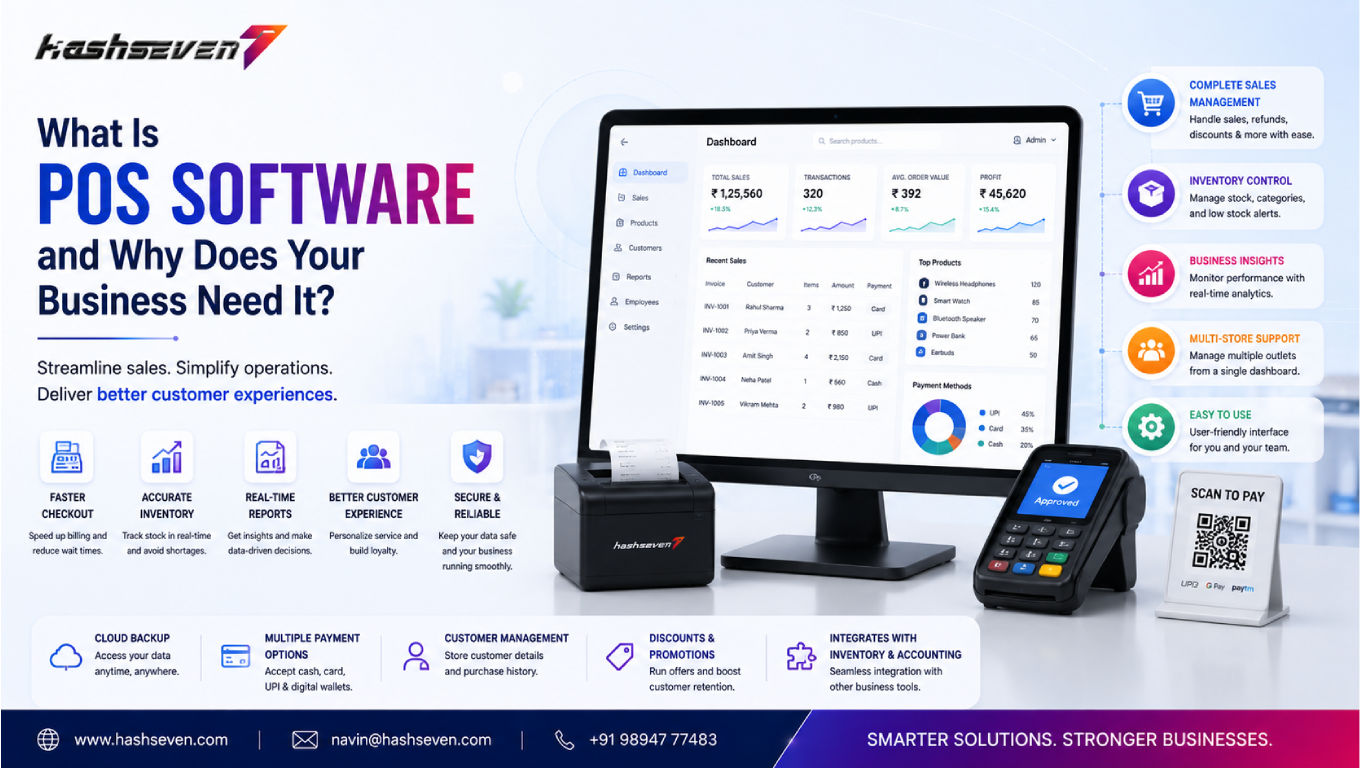

POS Software (Point of Sale Software) is a digital system that enables businesses to process sales transactions, manage inventory, track customer information, and generate business reports from a single platform. It replaces traditional billing methods by combining software with hardware such as barcode scanners, receipt printers, cash drawers, and payment terminals.
A modern POS system records every transaction in real time, helping businesses maintain accurate inventory levels, monitor sales performance, and make informed decisions. It also supports multiple payment methods, making the checkout process faster and more convenient for customers.
Why Businesses Need POS Software
Managing sales manually becomes increasingly difficult as a business grows. POS Software helps organizations streamline daily operations by automating routine tasks and providing real-time access to critical business information.
Businesses need POS software because it:
- Speeds up the billing process
- Reduces human errors
- Tracks inventory automatically
- Supports multiple payment options
- Generates accurate sales reports
- Improves customer service
- Monitors employee performance
- Simplifies tax calculations
- Supports business expansion
Whether you manage one store or several branches, a POS solution helps maintain consistency and operational control.
Build a Website That Grows Your Business
A professionally developed website is the foundation of your online success. If you’re planning to create a responsive, fast, and SEO-friendly business website, explore our Website Development Services to see how Hashseven can help transform your ideas into a powerful digital presence.Read More
How POS Software Works
Understanding how POS Software works helps businesses maximize its value.
Step 1: Product Selection
When a customer selects products, the cashier scans each item’s barcode or selects it from the product catalog.
Step 2: Price Calculation
The system automatically calculates the product price, taxes, discounts, and applicable offers.
Step 3: Payment Processing
Customers can complete payment using:
- Cash
- Credit Cards
- Debit Cards
- UPI
- Mobile Wallets
- QR Code Payments
- Online Banking
The software securely records every transaction.
Step 4: Receipt Generation
After payment, the system generates a printed or digital receipt for the customer.
Step 5: Inventory Update
Inventory levels are updated automatically after every sale, helping businesses avoid stock shortages or overstocking.
Step 6: Business Reporting
Managers can access real-time reports that provide insights into:
- Daily Sales
- Best-Selling Products
- Revenue
- Inventory Status
- Customer Purchases
- Employee Performance
These reports support smarter business decisions
Top Benefits of POS Software
1. Faster Billing Process
One of the biggest advantages of POS Software is faster checkout. Barcode scanning and automated billing significantly reduce waiting times and improve customer satisfaction.
Benefits include:
- Quick checkout
- Reduced queues
- Faster transactions
- Better customer experience
2. Accurate Inventory Management
Managing inventory manually often results in errors. POS software automatically updates stock levels whenever products are sold or returned.
Businesses can:
- Monitor inventory in real time
- Receive low-stock alerts
- Prevent stock shortages
- Reduce excess inventory
- Track product movement
Accurate inventory management improves purchasing decisions and reduces losses.
3. Improved Sales Tracking
Every transaction is recorded automatically, making it easier to analyze sales performance.
Businesses can track:
- Daily sales
- Monthly revenue
- Product performance
- Peak sales hours
- Customer buying patterns
Sales analytics help identify opportunities for growth.
4. Better Customer Management
Many POS systems include built-in customer management features that store purchase history, preferences, and contact information.
This enables businesses to:
- Offer personalized promotions
- Create loyalty programs
- Improve customer retention
- Send targeted offers
- Build long-term relationships
5. Supports Multiple Payment Methods
Customers expect flexible payment options. Modern POS software accepts:
- Cash
- Credit Cards
- Debit Cards
- UPI Payments
- Digital Wallets
- Contactless Payments
Providing multiple payment choices improves convenience and customer satisfaction.
6. Employee Performance Monitoring
POS systems help business owners monitor employee productivity by tracking:
- Sales completed
- Attendance
- Working hours
- Refunds
- Discounts applied
Performance reports assist managers in improving operational efficiency.
7. Real-Time Business Insights
A modern POS solution provides dashboards that display live business data.
Business owners can monitor:
- Revenue
- Profit Margins
- Inventory Levels
- Sales Trends
- Customer Behavior
- Store Performance
Real-time insights enable faster and better business decisions.
Industries That Benefit from POS Software
Almost every customer-facing business can benefit from POS Software.
Retail Stores
- Billing
- Inventory Tracking
- Customer Management
- Sales Reports
Restaurants
- Table Management
- Kitchen Order Management
- Billing
- Online Orders
Supermarkets
- Barcode Billing
- Stock Management
- Supplier Management
- Loyalty Programs
Pharmacies
- Medicine Inventory
- Expiry Tracking
- Prescription Billing
- Customer Records
Salons & Spas
- Appointment Scheduling
- Service Billing
- Customer Profiles
- Staff Management
Electronics Stores
- Warranty Tracking
- Product Management
- Sales Reporting
- Customer Database
Clothing Stores
- Product Variants
- Size Management
- Inventory Control
- Seasonal Sales Reports
Wholesale Businesses
- Bulk Billing
- Supplier Management
- Purchase Orders
- Inventory Monitoring
Why Investing in POS Software Is Essential in 2026
Businesses today face increasing customer expectations, rising operational costs, and stronger competition. A modern POS Software solution helps organizations stay competitive by improving efficiency, enhancing customer service, and providing valuable business insights.
Whether you’re running a local retail shop or a growing chain of stores, implementing a reliable POS system can simplify operations and create a better shopping experience for your customers.
Essential Features Every POS Software Should Have
Selecting the right POS Software is essential for improving business efficiency and delivering a seamless customer experience. A modern POS solution should include the following features.
Inventory Management
An advanced inventory management system automatically updates stock levels after every sale, helping businesses avoid stock shortages and overstocking.
Key benefits include:
- Real-time stock updates
- Low-stock alerts
- Product tracking
- Supplier management
- Inventory reports
Sales and Billing
Fast and accurate billing improves customer satisfaction and reduces checkout time.
Modern billing features include:
- Barcode scanning
- Automatic tax calculation
- Discount management
- Invoice generation
- Digital receipts
Customer Management
Customer management tools help businesses understand customer behavior and improve relationships.
Features include:
- Customer profiles
- Purchase history
- Loyalty programs
- Reward points
- Personalized promotions
Employee Management
Business owners can monitor employee performance through:
- Attendance tracking
- Sales performance
- Shift management
- Role-based access
- Activity logs
Business Reporting
Comprehensive reports help businesses analyze performance and make informed decisions.
Reports typically include:
- Daily sales
- Monthly revenue
- Product performance
- Profit analysis
- Customer insights
- Inventory reports
Multi-Store Management
Businesses operating multiple locations can manage all branches from one centralized dashboard.
Benefits include:
- Centralized reporting
- Store-wise inventory
- Branch performance tracking
- Unified customer database
Cloud-Based Access
Cloud-based POS systems allow business owners to monitor operations remotely using smartphones, tablets, or computers.
Advantages include:
- Remote access
- Automatic backups
- Real-time synchronization
- Secure cloud storage
Multiple Payment Integration
Modern POS solutions support various payment methods, including:
- Cash
- Credit Cards
- Debit Cards
- UPI
- QR Payments
- Mobile Wallets
- Contactless Payments
Flexible payment options improve customer convenience.
How to Choose the Right POS Software
Choosing the right POS Software depends on your business size, industry, and operational needs.
Understand Your Business Requirements
Identify the challenges you want the POS system to solve before selecting a solution.
Choose Easy-to-Use Software
A simple and intuitive interface reduces employee training time and improves productivity.
Ensure Scalability
As your business grows, your POS system should support:
- Additional stores
- More products
- More employees
- Higher transaction volumes
Look for Strong Security
Choose software with:
- Data encryption
- User permissions
- Secure payment processing
- Automatic backups
- Activity monitoring
Check Customer Support
Reliable technical support ensures smooth operation and minimizes downtime.
Common Challenges When Implementing POS Software
Although POS systems offer numerous benefits, businesses may encounter implementation challenges.
Employee Training
Employees should receive proper training to maximize software efficiency.
Data Migration
Migrating customer and inventory data requires careful planning to prevent data loss.
Internet Connectivity
Cloud-based POS systems require a stable internet connection for real-time synchronization.
System Integration
Integrating POS software with accounting, ERP, and CRM systems improves operational efficiency but requires proper configuration.
Software Updates
Regular updates improve security, introduce new features, and enhance overall performance.
POS Software Trends in 2026
Technology continues to shape the future of retail and business management. These trends are expected to dominate POS Software in 2026.
Artificial Intelligence (AI)
AI helps businesses analyze customer behavior, predict sales trends, and automate inventory management.
Cloud-Based POS
Cloud solutions improve scalability, remote accessibility, and business continuity.
Contactless Payments
Customers increasingly prefer secure and fast payment methods such as NFC cards, QR codes, and mobile wallets.
Omnichannel Commerce
Modern POS systems integrate online and offline sales channels, providing a seamless shopping experience.
Advanced Business Analytics
Real-time dashboards and predictive analytics help businesses make smarter operational decisions.
Why Choose Hashseven Inc for POS Software Development?
Hashseven Inc develops innovative POS Software solutions tailored to the needs of retailers, restaurants, supermarkets, pharmacies, and growing businesses.
Our POS Software Services Include
- Custom POS Development
- Retail POS Solutions
- Restaurant POS Systems
- Pharmacy POS Software
- Inventory Management
- Barcode Billing
- Multi-Store Management
- Cloud POS Solutions
- Sales Reporting
- Technical Support & Maintenance
Our experienced developers create secure, scalable, and user-friendly POS solutions that improve business efficiency and customer satisfaction.
Conclusion
POS Software has become a vital business solution for companies aiming to improve operational efficiency, streamline billing, manage inventory accurately, and deliver exceptional customer experiences. As businesses continue to embrace digital transformation in 2026, investing in a reliable POS system enables faster transactions, real-time reporting, and smarter business decisions.
Whether you operate a retail store, restaurant, pharmacy, supermarket, or multi-location business, the right POS solution can simplify daily operations while supporting long-term growth. At Hashseven Inc, we specialize in building secure, scalable, and customized POS solutions designed to meet your unique business requirements.
Ready to modernize your business? Contact Hashseven Inc today and discover how our POS Software solutions can help you improve efficiency, increase profitability, and deliver a better customer experience
Frequently Asked Questions
1. What is POS Software?
POS Software is a digital system that helps businesses process sales transactions, manage inventory, generate reports, and improve customer management from a centralized platform.
2. Which businesses should use POS Software?
Retail stores, restaurants, pharmacies, supermarkets, clothing stores, electronics shops, salons, and wholesale businesses can all benefit from POS software.
3. Does POS Software help manage inventory?
Yes. POS systems automatically update inventory after every sale, helping businesses monitor stock levels accurately.
4. Can POS Software accept digital payments?
Yes. Modern POS solutions support UPI, credit cards, debit cards, QR payments, digital wallets, contactless payments, and cash transactions.
5. Why choose Hashseven Inc for POS Software Development?
Hashseven Inc delivers customized POS solutions with advanced billing, inventory management, reporting, cloud integration, and ongoing technical support to help businesses operate efficiently.
Ready to Build a Professional Website for Your Business?
Turn your business into a powerful online brand with Hashseven.
Since 2017, we’ve helped businesses grow through professional website development, mobile apps, custom software, SEO, digital marketing, CRM, POS solutions, and Meta-approved WhatsApp automation. Let’s create a fast, secure, and conversion-focused website that attracts more customers and drives real business growth.


