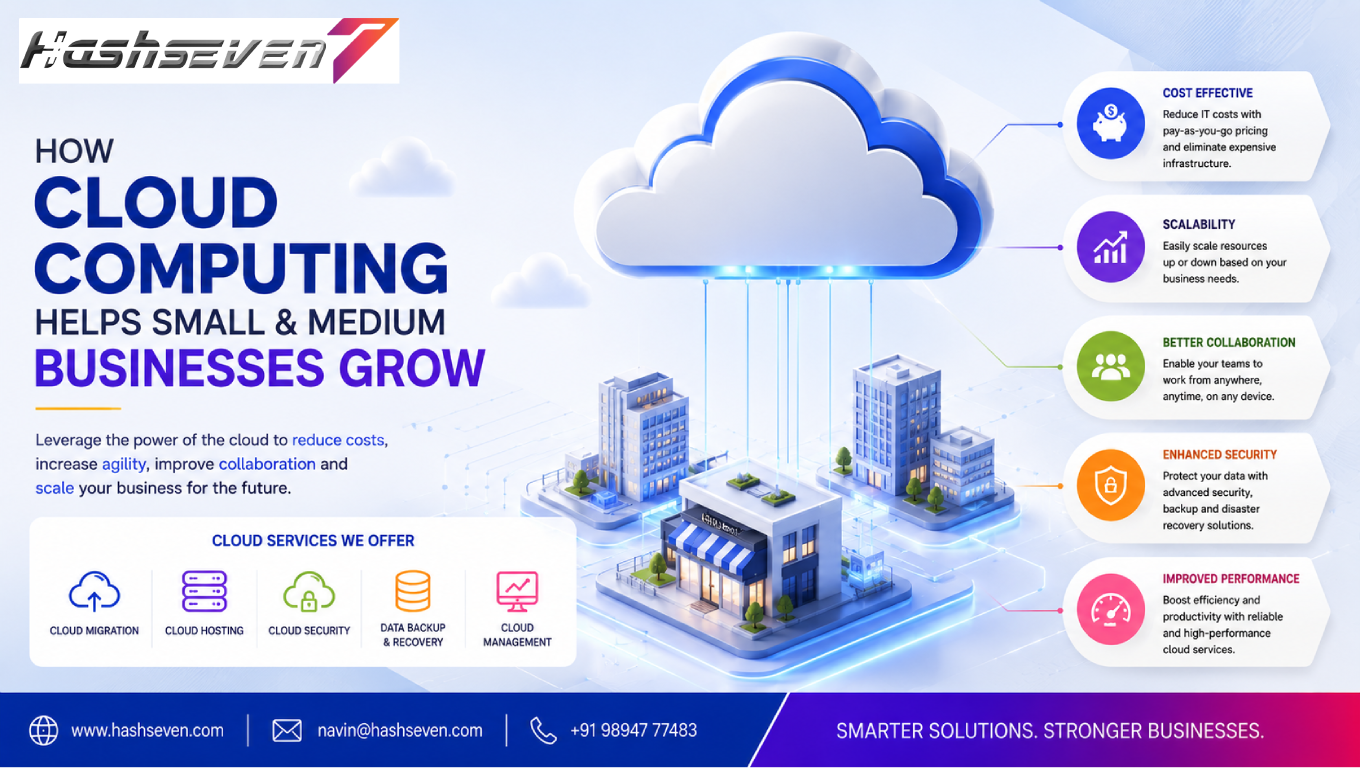

In today’s digital economy, technology plays an important role in how small and medium businesses operate, compete, and grow. From managing customer information to storing files, running applications, processing transactions, and analyzing business data, companies depend on technology for everyday operations. This is where cloud computing for business can provide significant advantages.
Traditional IT infrastructure often requires businesses to purchase servers, maintain hardware, manage software installations, and invest in technical resources. For small and medium businesses, these requirements can increase costs and create operational challenges.
Cloud computing provides an alternative approach by allowing businesses to access computing resources, software, storage, databases, and other technology services through the internet.
Instead of maintaining all infrastructure internally, businesses can use cloud-based resources according to their requirements.
This can help organizations improve flexibility, reduce infrastructure responsibilities, support remote work, strengthen collaboration, and scale their operations more efficiently.
In this guide, we will explore how cloud computing for business helps small and medium businesses grow, the major benefits, common cloud services, implementation considerations, challenges, security practices, and future trends.
What Is Cloud Computing for Business?
Cloud computing for business refers to using internet-based computing resources and services to support business operations.
These resources can include:
- Cloud storage
- Virtual servers
- Databases
- Business applications
- Backup systems
- Analytics platforms
- Development environments
- Security services
- Communication tools
Instead of purchasing and maintaining every technology resource internally, businesses can access services from cloud providers based on their requirements.
Cloud computing can be used by businesses of almost any size, from startups to growing organizations and large enterprises.
Build a Website That Grows Your Business
A professionally developed website is the foundation of your online success. If you’re planning to create a responsive, fast, and SEO-friendly business website, explore our Website Development Services to see how Hashseven can help transform your ideas into a powerful digital presence.
Why Cloud Computing Matters for Small and Medium Businesses
Small and medium businesses often operate with limited budgets and resources.
They may need to:
- Control technology costs
- Support remote employees
- Improve collaboration
- Protect business data
- Scale quickly
- Launch digital services
- Reduce IT complexity
Cloud computing can help address many of these requirements.
The ability to access technology resources without building a large physical infrastructure can allow businesses to focus more attention on customers, products, and growth.
1. Reduce IT Infrastructure Costs
One of the most important benefits of cloud computing for business is reducing the need for extensive physical infrastructure.
Traditional IT environments may require businesses to purchase:
- Servers
- Storage devices
- Networking equipment
- Backup hardware
- Cooling systems
- Physical space
Cloud services can reduce the need to purchase and maintain much of this infrastructure internally.
Instead, businesses can pay for cloud resources according to their selected service model and usage.
This can make technology investment more flexible.
2. Lower Hardware Maintenance Requirements
Physical servers require ongoing maintenance.
Businesses may need to manage:
- Hardware failures
- Software updates
- Security patches
- Storage expansion
- Server monitoring
- Backup systems
With cloud services, much of the underlying infrastructure is managed by the cloud provider, depending on the service model.
This can reduce the amount of infrastructure maintenance handled directly by the business.
3. Scale Resources as the Business Grows
Growth can create new technology requirements.
A company may start with a small number of employees and later expand its:
- Customer base
- Product range
- Website traffic
- Data volume
- Employee count
- Geographic reach
Cloud infrastructure can often be scaled to accommodate changing requirements.
For example, an online business experiencing increased traffic may need additional computing resources during peak periods.
Cloud scalability can help businesses respond to these changes more efficiently.
4. Support Remote Work
Remote and hybrid work have become common across many industries.
Employees may need access to:
- Files
- Business applications
- Customer information
- Communication platforms
- Project management tools
- Company systems
Cloud-based applications can allow authorized employees to access resources from different locations.
This can make it easier for businesses to support distributed teams.
Security controls should still be implemented to ensure that only authorized users can access company resources.
5. Improve Team Collaboration
Cloud platforms make it easier for employees to work with shared information.
Teams can collaborate on:
- Documents
- Spreadsheets
- Projects
- Customer information
- Business reports
- Presentations
Instead of maintaining multiple local copies of files, employees can work from centralized cloud-based resources.
This can reduce version conflicts and improve collaboration.
6. Improve Business Productivity
Cloud applications can simplify many daily business activities.
Employees can access applications without depending entirely on a specific office computer or physical server.
For example, cloud-based tools can support:
- Accounting
- CRM
- Project management
- Communication
- File storage
- Marketing
- Human resources
This can help employees work more efficiently and access the tools they need from different locations.
7. Access Business Applications Anywhere
One major advantage of cloud computing for business is accessibility.
Authorized employees can potentially access cloud applications from:
- Offices
- Homes
- Client locations
- Business trips
- Remote work environments
This flexibility can be especially useful for sales teams, consultants, field workers, and distributed organizations.
Access should always be protected through appropriate authentication and authorization controls.
8. Improve Data Backup
Business data can be lost because of:
- Hardware failure
- Accidental deletion
- Cybersecurity incidents
- Software problems
- Natural disasters
- Human error
Cloud-based backup services can provide additional options for protecting important information.
Businesses should establish a backup strategy that includes:
- Backup frequency
- Retention periods
- Recovery procedures
- Access controls
- Backup testing
A backup is useful only if the organization can successfully restore the data when needed.
9. Support Disaster Recovery
Disaster recovery focuses on restoring business operations after a major disruption.
Cloud infrastructure can support disaster recovery by providing access to:
- Backup data
- Replicated systems
- Recovery environments
- Alternative infrastructure
Businesses should create recovery plans based on their specific operational requirements.
Important considerations include:
- Recovery time objectives
- Recovery point objectives
- Critical applications
- Data priorities
- Communication procedures
10. Improve Business Agility
Small businesses often need to react quickly to changing market conditions.
Cloud technology can support faster changes to:
- Computing resources
- Applications
- Storage
- Development environments
- Business systems
This flexibility can help businesses experiment with new ideas without always requiring significant physical infrastructure investments.
11. Enable Faster Business Expansion
Businesses expanding into new locations may need additional technology resources.
Cloud services can make it easier to provide employees with access to centralized applications and information.
For example, a company opening a new branch may not need to build an entirely separate server infrastructure at that location.
This can simplify technology deployment.
12. Support Digital Transformation
Digital transformation involves using technology to improve business processes, customer experiences, and operations.
Cloud computing can provide infrastructure for:
- Digital applications
- Data analytics
- CRM systems
- ERP platforms
- E-commerce
- AI applications
- Automation
Cloud infrastructure can therefore serve as an important foundation for broader digital transformation initiatives.
13. Improve Data Accessibility
Business information is often spread across multiple locations.
Cloud platforms can centralize important information and make it available to authorized users.
For example, management may access:
- Sales reports
- Financial information
- Inventory data
- Customer information
- Performance dashboards
This can improve visibility and support faster decision-making.
14. Enable Better Business Analytics
Data can help businesses understand customers and operations.
Cloud-based analytics platforms can help organizations process and analyze information such as:
- Sales
- Website traffic
- Customer behavior
- Marketing performance
- Inventory
- Revenue
Businesses can use these insights to identify trends and make more informed decisions.
15. Support Customer Relationship Management
Cloud-based CRM systems allow businesses to manage customer information through online platforms.
A CRM can help teams track:
- Leads
- Customers
- Sales opportunities
- Communication
- Follow-ups
- Support requests
Sales and customer service teams can access relevant information from different locations.
This can improve customer management and coordination.
16. Support ERP Systems
ERP software connects different business functions within one system.
Cloud ERP can support:
- Finance
- Inventory
- Purchasing
- Sales
- Human resources
- Manufacturing
- Supply chain
Cloud-based ERP can be particularly useful for growing businesses that need centralized information without maintaining extensive internal infrastructure.
17. Improve Software Development
Cloud computing can provide developers with environments for:
- Application development
- Testing
- Databases
- Deployment
- Monitoring
- Collaboration
Development teams can create and test applications without purchasing dedicated physical servers for every project.
Cloud-based development environments can also support distributed development teams.
18. Support E-commerce Growth
Online businesses may experience unpredictable traffic.
For example, traffic can increase significantly during:
- Sales campaigns
- Festivals
- Product launches
- Holiday seasons
- Marketing campaigns
Cloud infrastructure can provide scalability options that help businesses handle changing workloads.
Businesses should still plan capacity, performance, monitoring, and costs carefully.
19. Provide Flexible Storage
As businesses grow, their data requirements also increase.
They may need storage for:
- Documents
- Images
- Videos
- Customer records
- Business reports
- Application data
- Backups
Cloud storage can provide flexible storage capacity without requiring businesses to continuously purchase physical storage hardware.
20. Improve Business Continuity
Business continuity means maintaining important operations during disruptions.
Cloud-based systems can support continuity by providing alternative ways to access applications and information.
For example, if employees cannot access the main office, cloud-based systems may allow authorized staff to continue working remotely.
Business continuity still requires proper planning, security, backup, and recovery procedures.
21. Strengthen Security With Proper Configuration
Cloud computing does not automatically make a business secure.
Security depends on both the provider’s infrastructure and the customer’s configuration and practices.
Businesses should consider:
- Strong authentication
- Multi-factor authentication
- Role-based access
- Encryption
- Security monitoring
- Software updates
- Access reviews
- Backup policies
- Incident response
Organizations should clearly understand which security responsibilities belong to the provider and which remain with the customer.
The NIST Cybersecurity Framework provides a useful reference for managing cybersecurity risks.
22. Reduce the Burden on Internal IT Teams
Small businesses may not have large IT departments.
Cloud services can reduce the need to manage certain infrastructure components internally.
Depending on the service, the provider may manage:
- Physical servers
- Data center infrastructure
- Hardware maintenance
- Certain software updates
- Infrastructure monitoring
This can allow internal teams to focus more on business applications and strategic technology initiatives.
23. Support Flexible Payment Models
Traditional infrastructure often requires large upfront investments.
Cloud services commonly use subscription or usage-based models, depending on the provider and service.
This can allow businesses to align technology spending more closely with operational requirements.
However, businesses should monitor cloud usage carefully because uncontrolled consumption can increase costs.
24. Make Technology More Accessible to Startups
Startups often have limited capital.
Cloud services can allow startups to access:
- Computing
- Storage
- Databases
- Development tools
- Business applications
- Analytics
without building extensive physical infrastructure from the beginning.
This can lower some barriers to launching technology-driven businesses.
25. Improve Communication
Cloud-based communication platforms can support:
- Video meetings
- Messaging
- File sharing
- Team collaboration
Employees can communicate from different locations while working within shared digital environments.
This is particularly useful for remote and hybrid teams.
26. Support Automation
Cloud platforms can provide infrastructure for business automation.
Businesses can automate tasks such as:
- Data processing
- Notifications
- Customer communication
- Report generation
- Workflow approvals
- Data synchronization
Automation can reduce repetitive work and improve operational efficiency.
27. Enable Artificial Intelligence
AI applications often require significant computing resources.
Cloud platforms can provide access to infrastructure for:
- Machine learning
- AI models
- Data processing
- Predictive analytics
- Natural language applications
This can make advanced technology more accessible to businesses that do not have extensive internal computing infrastructure.
28. Improve Software Updates
Cloud-based applications can simplify software deployment and updates.
Depending on the service, updates may be managed by the provider.
This can reduce the need for employees to manually install updates across individual devices.
Businesses should still review update policies and ensure that changes do not negatively affect critical workflows.
29. Support Business Innovation
Cloud computing can make experimentation easier.
Businesses can test:
- New applications
- Digital products
- Marketing platforms
- Analytics solutions
- Automation tools
- AI services
This flexibility can encourage organizations to experiment and innovate without always making large infrastructure investments.
30. Create a Strong Technology Foundation for Growth
Ultimately, cloud computing for business can provide a flexible technology foundation.
As businesses grow, cloud environments can support:
- More employees
- More customers
- More applications
- More data
- More locations
- More digital services
When properly planned, cloud infrastructure can evolve alongside the organization.
Types of Cloud Computing Services
Businesses commonly encounter three major service models.
Infrastructure as a Service
IaaS provides infrastructure resources such as:
- Virtual machines
- Storage
- Networking
- Computing resources
Businesses have greater control over the operating environment while the provider manages the underlying physical infrastructure.
Platform as a Service
PaaS provides a platform for developing and deploying applications.
Developers can focus more on application development without managing all underlying infrastructure components.
Software as a Service
SaaS provides complete applications through the internet.
Examples include cloud-based:
- CRM
- Accounting
- Project management
- Collaboration tools
SaaS is often particularly accessible to small businesses because it can reduce infrastructure management requirements.
Public Cloud vs Private Cloud vs Hybrid Cloud
Public Cloud
Resources are provided through a cloud provider’s shared infrastructure.
Advantages:
- Scalability
- Accessibility
- Flexible resource usage
- Reduced infrastructure management
Private Cloud
Cloud infrastructure is dedicated to a specific organization.
Advantages:
- Greater control
- Custom architecture
- Specific security or compliance requirements
Hybrid Cloud
Hybrid environments combine cloud and other infrastructure models.
They can provide flexibility for businesses with mixed requirements.
The right architecture depends on the organization’s technical, financial, security, and operational needs.
Cloud Computing Challenges for Small Businesses
Cloud computing provides many benefits, but businesses should also understand its challenges.
1. Unexpected Costs
Cloud spending can increase when resources are not monitored.
Businesses should establish:
- Budgets
- Usage monitoring
- Cost alerts
- Resource policies
2. Internet Dependency
Many cloud services require reliable internet connectivity.
Businesses should consider connectivity and backup options for critical operations.
3. Security Misconfiguration
Incorrect permissions or configurations can expose business information.
Security should be reviewed regularly.
4. Vendor Lock-In
Moving applications and data between providers can sometimes be difficult.
Businesses should consider portability and exit strategies for critical workloads.
5. Compliance Requirements
Certain industries may have specific requirements for data handling, storage, and access.
Businesses should evaluate applicable regulations before selecting cloud services.
Cloud Computing Best Practices for Small and Medium Businesses
Businesses can improve their cloud adoption strategy by following these practices:
- Identify clear business objectives
- Choose services based on actual requirements
- Create a cloud budget
- Monitor usage and costs
- Enable strong authentication
- Use multi-factor authentication
- Apply least-privilege access
- Encrypt sensitive information
- Maintain backups
- Test recovery procedures
- Monitor system performance
- Review vendor agreements
- Train employees
- Regularly review security settings
A cloud strategy should be treated as an ongoing business initiative rather than a one-time migration.
How to Move a Small Business to the Cloud
Businesses can follow a structured process.
Step 1: Assess Current Infrastructure
Identify existing:
- Applications
- Servers
- Databases
- Files
- Workflows
Step 2: Identify Business Requirements
Determine what the business needs from cloud technology.
Step 3: Prioritize Workloads
Start with systems that provide clear benefits from cloud migration.
Step 4: Select Cloud Services
Compare providers based on:
- Cost
- Security
- Reliability
- Performance
- Support
- Scalability
Step 5: Create a Migration Plan
Define:
- Migration order
- Responsibilities
- Timelines
- Testing
- Backup procedures
Step 6: Migrate Data and Applications
Move selected workloads according to the migration plan.
Step 7: Test Everything
Verify:
- Performance
- Security
- Data integrity
- Application functionality
- User access
Step 8: Train Employees
Help employees understand new cloud-based workflows.
Step 9: Monitor and Optimize
Review performance, security, usage, and costs after migration.
How to Choose the Right Cloud Provider
Businesses should compare cloud providers based on:
- Pricing
- Reliability
- Security
- Geographic availability
- Support
- Scalability
- Compliance
- Integration capabilities
- Service availability
- Data management options
Businesses should not choose a provider based solely on price.
Reliability, security, support, and long-term suitability are equally important.
Cloud Computing and Business ROI
The value of cloud computing should be evaluated beyond infrastructure savings.
Potential benefits include:
- Reduced hardware costs
- Lower maintenance requirements
- Faster deployment
- Improved productivity
- Remote accessibility
- Better collaboration
- Greater scalability
- Improved business continuity
- Faster innovation
Businesses should compare these benefits with:
- Subscription costs
- Migration costs
- Training
- Security
- Support
- Ongoing cloud usage
A clear cost-benefit analysis can help determine whether a particular cloud strategy is appropriate.
Future of Cloud Computing for Business
Cloud technology will continue to evolve.
Businesses are likely to see increasing adoption of:
- Artificial intelligence
- Machine learning
- Edge computing
- Serverless architecture
- Cloud automation
- Advanced cybersecurity
- Real-time analytics
- Multi-cloud strategies
- Hybrid cloud environments
AI and automation will increasingly work alongside cloud infrastructure to help businesses process information, automate workflows, and create more intelligent applications.
The future of cloud computing for business will focus not only on storing data and running applications but also on enabling faster innovation and smarter decision-making.
Frequently Asked Questions
1. What is cloud computing for business?
Cloud computing for business means using internet-based computing services such as storage, servers, databases, applications, and analytics to support business operations without relying entirely on locally managed infrastructure.
2. How does cloud computing help small businesses grow?
Cloud computing can help small businesses reduce infrastructure requirements, support remote work, improve collaboration, scale resources, access business applications, and launch digital services more efficiently.
3. Is cloud computing secure for small businesses?
Cloud computing can be secure when properly configured and managed. Businesses should use strong authentication, access controls, encryption, monitoring, backups, and appropriate security policies.
4. How much does cloud computing cost for a small business?
Costs vary depending on the services, number of users, storage, computing requirements, applications, and usage. Businesses should compare both initial migration costs and ongoing operating expenses.
5. Should every small business move to the cloud?
Not necessarily. Cloud adoption should be based on business requirements, security needs, budget, existing infrastructure, compliance obligations, and operational goals. A hybrid approach may be appropriate for some businesses.
Conclusion
Cloud computing for business can provide small and medium businesses with flexible access to technology without requiring them to build and maintain extensive physical infrastructure.
From reducing hardware requirements and supporting remote work to improving collaboration, scalability, backup, analytics, automation, and digital transformation, cloud technology can provide a strong foundation for business growth.
However, successful cloud adoption requires more than moving applications to the internet. Businesses should carefully plan security, costs, data migration, compliance, performance, backup, and employee training.
The most effective approach is to identify real business needs, select suitable cloud services, migrate workloads carefully, and continuously monitor the environment.
When implemented strategically, cloud computing can help small and medium businesses become more flexible, efficient, competitive, and prepared for future digital opportunities.
Ready to Build a Professional Website for Your Business?
Turn your business into a powerful online brand with Hashseven.
Since 2017, we’ve helped businesses grow through professional website development, mobile apps, custom software, SEO, digital marketing, CRM, POS solutions, and Meta-approved WhatsApp automation. Let’s create a fast, secure, and conversion-focused website that attracts more customers and drives real business growth.